Feeds:
Posts
Comments

Posts Tagged ‘digital literacy’

Please use this button on your site for DigiLit Sunday posts
Please use this button on your site for DigiLit Sunday posts

high water

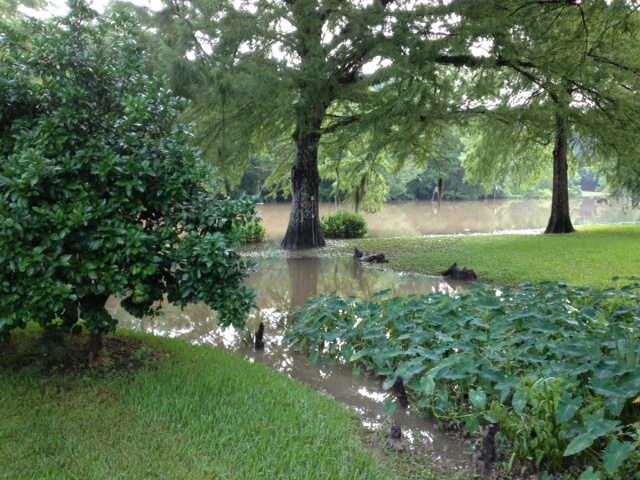
It’s been raining for days. You can hear the grass growing. Everything is lush and green, but at some point the ground gets saturated and overflows. When the rain comes too fast, the water floods the streets. On Friday, businesses closed early so people could make their slow flooded way home.

Sometimes we do this to our students. This week I attended the Rice University AP Institute. My brain went into flood mode. Too much information in, not enough draining out. I learned a valuable lesson about being a student. Finally on Friday, we were given the time to design our own lessons. The room was buzzing. My colleagues and I designed a frame for our teaching this year. We were able to sit and talk and process the water of information. We must give our students this time.

Digital learning can be about gaining knowledge, but mostly it is about processing knowledge. This summer I’ve been flooded with new ways for my students to process information. I’ll need to hand this learning over to them and give them time to find the right application for them. Will it be Prezi, Thinglink, or Haiku Deck? Maybe blogging, Animoto, or Tapestry? The important thing is to control the flood waters, try not to overwhelm them, and give then the time to process and apply.

Let’s continue the conversation about online learning communities for our students. Sheri Edwards has set up an edublog called Connect 2 Learn. Check it out and add your ideas.

The Educator Collaborative is Live! Join the group. Besty Hubbard has a group for Young Writers.

Link up your DigiLit Sunday post:

Read Full Post »

Please use this button on your site for DigiLit Sunday posts

Please use this button on your site for DigiLit Sunday posts

Photo from Mind, Body, Fitness

Photo from Mind, Body, Fitness

The balance poses in yoga are a kind of test for me. If the balance pose is tough, and I teeter and fall, I know there is something not quite right. If I can stand tall and balance with focus, I feel complete. When we talk about Digital Literacy both in our own lives and in the lives of our students, I think balance is essential.

Each day I begin my morning checking email, Facebook, and reading blog posts. The more people I connect with in this digital environment, the more time this takes. I could so easily get stuck at the computer, and sometimes I do. I have to remember my nondigital life, the one in which the pets live, and my family, and my face-to-face friends.

In my classroom, the computers are tools. They stand ready for students to publish writing, to research, and to create a presentation. They do not and will not replace the face-to-face discussion of ideas, the pen-to-paper of the journal entry, or the shelves of books. Balance.

How do you balance your digital life with your real life?

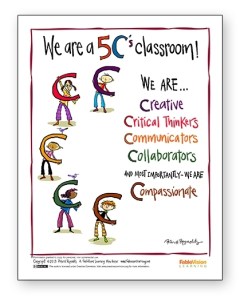
I am a follower of Peter Reynolds. He is the creator of Dot, Ish, and most recently Going Places. His artwork as well as his ideas are inspiring. I would love to print out all his posters and decorate my classroom with them. This one shows the 5 Cs of 21st Century Education: Creativity, Collaboration, Communication, and Critical Thinking with the addition of a very important C, Compassion.

Click on the image to download this poster.

Click on the image to download this poster.

As 21st Century educators, we can so easily get on overload. We can get caught up in the technology, social media, and the continuous flow of online apps. However, we need to remember balance, keep a focal point, and lead our students into the world of the 5Cs with or without technology.

Add your DigiLit Sunday post to Mr. Linky. Next Sunday I will not be posting. (My youngest daughter is graduating from graduate school. Woo Hoo! If you want to take on the round-up next Sunday, let me know in the comments or by email.

Read Full Post »

Slice of Life Day 30.  Join the Two Writing Teachers Slice of Life Challenge.

Slice of Life Day 30. Join the Two Writing Teachers Slice of Life Challenge.

Please use this button on your site for DigiLit Sunday posts

Please use this button on your site for DigiLit Sunday posts

Do you YouTube? I was pleased when our district opened the site this year. We are using a new Common Core Standards aligned curriculum that depends on YouTube videos for instruction. This can be a dangerous thing. Especially when you forget that restrictions have been lifted and allow students to look up a Christina Aguilera song. Whoopsie! Naked woman! Click off! Yes, this happened, but thankfully no body parts were revealed and the kids all understood that it was inappropriate for school. Whew! Try again.

Now I am very cautious and preview whatever we watch. This week a friend on Facebook posted an amazing video of starling murmurations. Amazing! We watched this to have a brain vacation, as one of my students called it. This was almost a spiritual experience, such beauty, a miracle shared. Shortly after our brain vacation, we wrote nonfiction rhyming poems. I used Laura Purdie Salas’ lesson from Teaching Authors. This was a collaborative piece that Kaylie and Matthew wrote.

Starling Birds

Mesmerizing clouds of iridescence

Inky black plumage of brilliance

Dark plump birds in coexistence

Nature’s way of perfect balance

–a collaborative poem by Kaylie and Matthew

Please link up your Digital Literacy post today.

Read Full Post »

Please use this button on your site for DigiLit Sunday posts

Please use this button on your site for DigiLit Sunday posts

Slice of Life Day 23.  Join the Two Writing Teachers Slice of Life Challenge.

Slice of Life Day 23. Join the Two Writing Teachers Slice of Life Challenge.

Today is Digilit Sunday. Link up your digital literacy post each Sunday. Use the logo on your site and link back here.

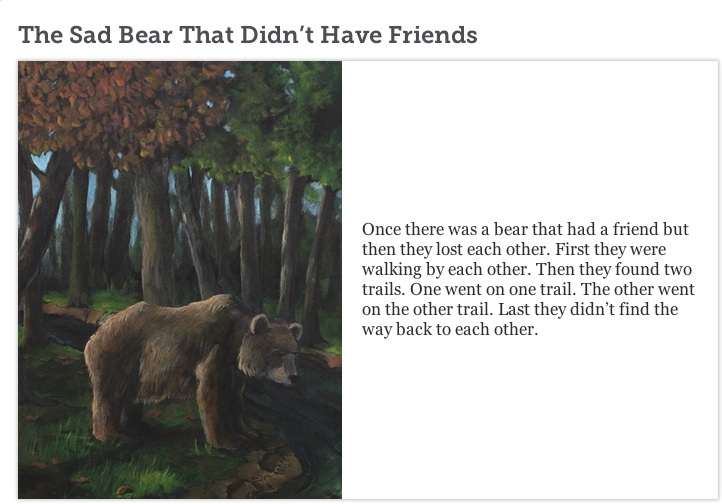
I teach gifted elementary kids. At any time during the year, I can get new students. Recently I was blessed with two first graders. I am not as comfortable with this age as I am with middle grades. I introduce them to using technology for presentations. They will need technology skills as they move up in grades in gifted classes. These two students are total opposites in tech savviness. Andrew (is it a boy thing?) learns quickly. He has made two Powerpoints learning how to upload images and use the animation tools. So I wanted him to try something different and new. I directed him to Storybird. If you haven’t tried Storybird, you should. I think it is great for younger students. My older ones feel restricted by the choices of images.

Andrew's storybird copy

Andrew found a palate of images that he liked, and immediately wrote the title, The Sad Bear that Didn’t Have Friends. The pictures led him to write a story about a bear and his friend, a girl named Gina, who were separated in the woods. The bear found new friends, but Gina only found a tree shaped like a peacock. The images led Andrew to write more and add a little humor as well. Using Storybird, I was able to show him some basic editing, such as adding punctuation and capital letters. He also wrote using and over and over. I read his long sentence without taking a breath to show him that the reader needs a period or a comma, so she can breathe. I think we both enjoyed this process. Andrew was proud to read his story aloud to his classmates using the smart board.

http://storybird.com/books/the-sad-bear-that-didnt-have-friends/?token=qsuvuqe5vc

Link up your Digital Literacy post this week:

Read Full Post »

Slice of Life Day 2.  Join the Two Writing Teachers Slice of Life Challenge.

Slice of Life Day 2. Join the Two Writing Teachers Slice of Life Challenge.

My students worked hard all week and finished the week’s assignments, so on Friday we had some free time. We usually celebrate with Game Day. And some students did play games, but I worked with Vannisa on a different project.

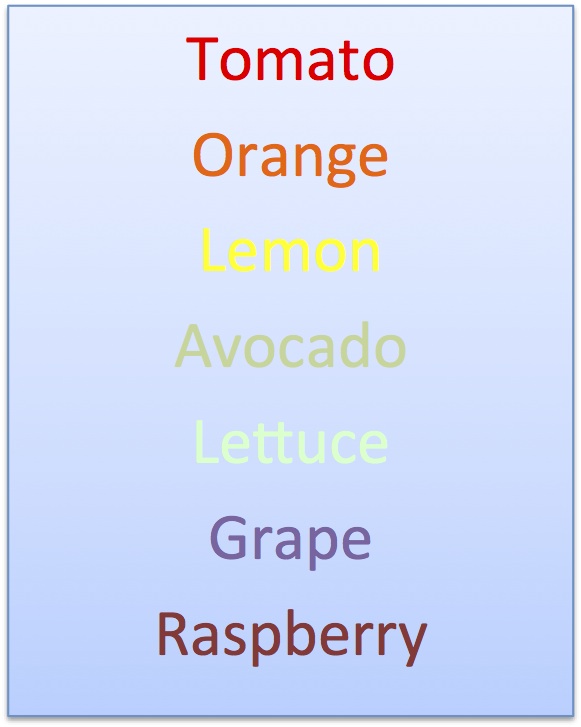
For Chalk-a-bration Day, Vannisa wrote a poem using a series of color words. When you look at the poem, it really just looks like a list of words, but when I talked to Vannisa about it, she said, “Close your eyes and imagine each color as it changes to the next one.”

Vannisa's colors

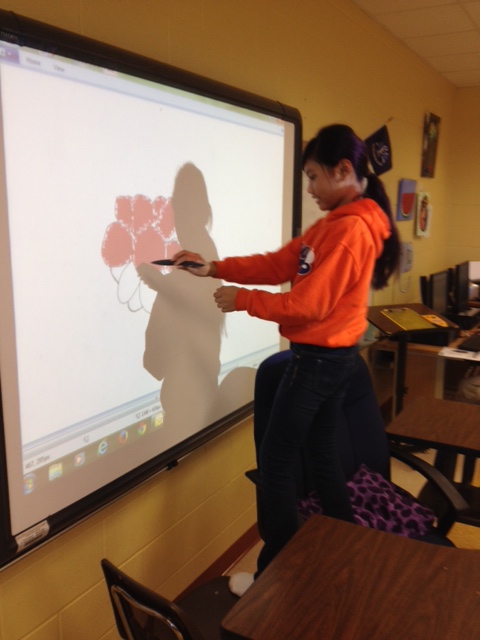
Her comment made me think. What about using Paint on the Promethian board and creating a video of a single flower changing color? Vannisa liked the idea and set to work.

digital vannisa

This whole process took an hour for her to do. Most teachers don’t have this kind of time to allow a student to “play.” I have the luxury of working with small groups of gifted students. Putting the images into a Moviemaker movie was fairly quick. One thing, for sure, Vannisa had a good time putting it all together. My question is this: Was this experience just fun or was there learning involved? And what learning may lead to further learning? Will my other students want to illustrate a poem and make a movie? Is this a valuable use of class time?

If you have written a blog post about Digital Literacy, please post a link. And consider following the Digital Literacy group on Facebook.

Read Full Post »

« Newer Posts